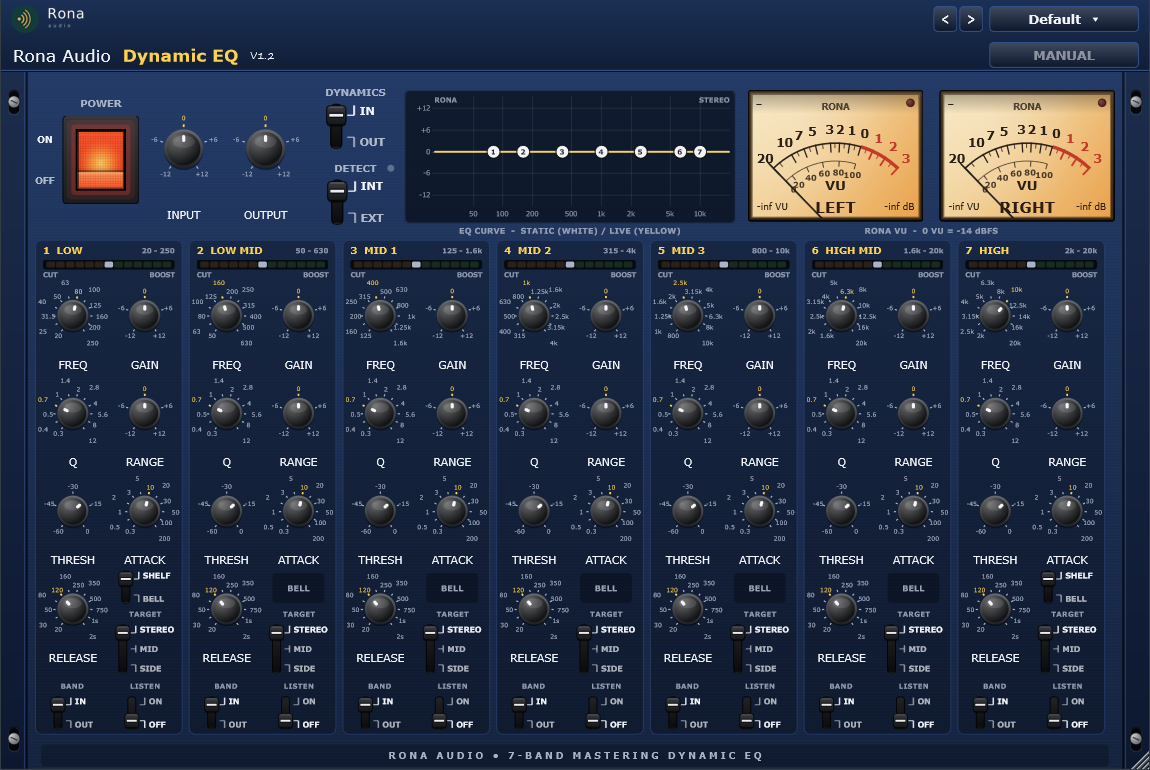
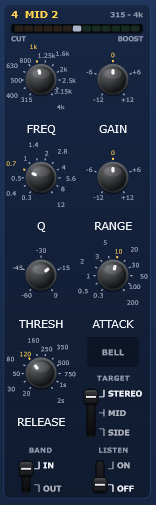
Dynamic EQ is a Rona Audio seven-band mastering dynamic equaliser. Every band is a fully featured static equaliser (stepped frequency, 0.5 dB gain, stepped Q, shelf or bell on the outer bands) and at the same time a dynamic band: a band-pass detector at the same frequency drives the band gain from its static value toward the RANGE you set, with stepped attack and release and a fixed 6 dB soft knee. Negative RANGE tames a frequency only when it becomes a problem (resonances, sibilance, boomy low end, harsh transients); positive RANGE adds energy only when the material demands it. Every band can work on the STEREO signal, on the MID or on the SIDE channel, and every detector can listen to the programme or to an external sidechain.
Mastering edition means every control is stepped (detented) for exact recall and matched settings between channels and sessions: frequencies come from per-band 12-step tables, gains and ranges move in 0.5 dB steps, thresholds in 1 dB steps, Q / attack / release from fixed lists. Zero latency, linear minimum-phase filters, no oversampling required (there is no nonlinear stage).
Figure 1 – the complete plugin interface
- POWER — Click-free power; OFF passes the programme untouched (20 ms crossfade)
- INPUT — Input trim before the EQ
- OUTPUT — Output trim after the EQ
- DYNAMICS — IN = dynamic action active on every band; OUT = static EQ only (RANGE ignored)
- DETECT — Detector source for every band: INT (the programme, before the band) or EXT (the sidechain bus)
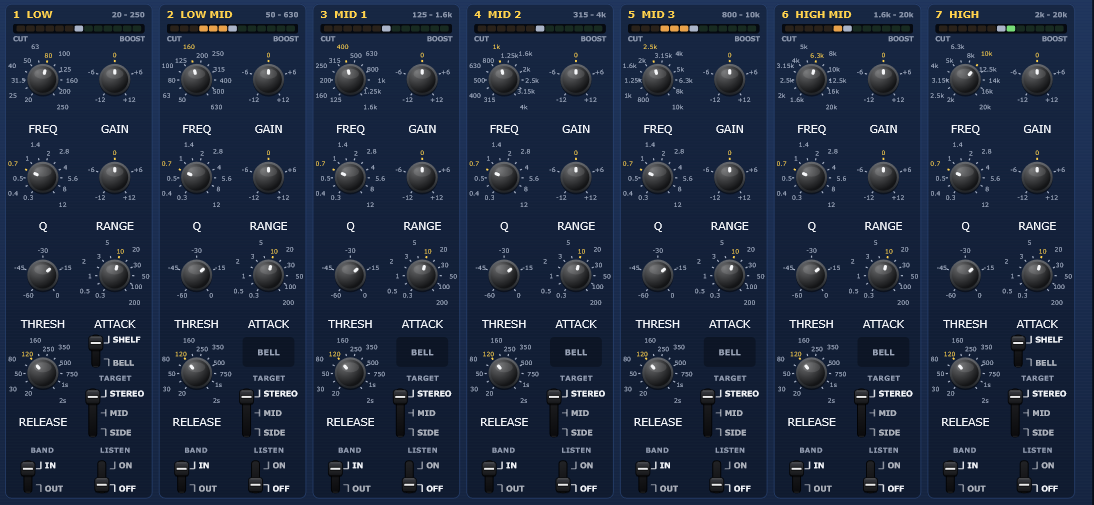
- BAND 1 (LOW) IN/OUT — Band in or out of circuit (out = flat, click-free fade)
- BAND 1 (LOW) SHAPE — LOW SHELF or BELL
- BAND 1 (LOW) FREQ — Centre / corner frequency, stepped: 20 Hz, 25 Hz, 31.5 Hz, 40 Hz, 50 Hz, 63 Hz, 80 Hz, 100 Hz, 125 Hz, 160 Hz, 200 Hz, 250 Hz
- BAND 1 (LOW) GAIN — Static band gain
- BAND 1 (LOW) Q — Bandwidth (bell) or slope (shelf), stepped: 0.3, 0.4, 0.5, 0.7, 1, 1.4, 2, 2.8, 4, 5.6, 8, 12
- BAND 1 (LOW) RANGE — Dynamic gain: the band moves from GAIN toward GAIN + RANGE as the detector rises above THRESH (negative = dynamic cut, positive = dynamic boost, 0 = static band)
- BAND 1 (LOW) THRESH — Detector threshold (band-passed peak level); the full RANGE is reached |RANGE| dB above it (6 dB soft knee)
- BAND 1 (LOW) ATTACK — Detector attack, stepped: 0.3 ms, 0.5 ms, 1 ms, 2 ms, 3 ms, 5 ms, 10 ms, 20 ms, 30 ms, 50 ms, 100 ms, 200 ms
- BAND 1 (LOW) RELEASE — Detector release, stepped: 20 ms, 30 ms, 50 ms, 80 ms, 120 ms, 160 ms, 250 ms, 350 ms, 500 ms, 750 ms, 1 s, 2 s
- BAND 1 (LOW) TARGET — Which channel the band filters and its detector listens to: STEREO (L and R), MID or SIDE
- BAND 1 (LOW) LISTEN — Monitors the band detector signal (sidechain listen) instead of the programme
- BAND 2 (LOW MID) IN/OUT — Band in or out of circuit (out = flat, click-free fade)
- BAND 2 (LOW MID) FREQ — Centre / corner frequency, stepped: 50 Hz, 63 Hz, 80 Hz, 100 Hz, 125 Hz, 160 Hz, 200 Hz, 250 Hz, 315 Hz, 400 Hz, 500 Hz, 630 Hz
- BAND 2 (LOW MID) GAIN — Static band gain
- BAND 2 (LOW MID) Q — Bandwidth (bell) or slope (shelf), stepped: 0.3, 0.4, 0.5, 0.7, 1, 1.4, 2, 2.8, 4, 5.6, 8, 12
- BAND 2 (LOW MID) RANGE — Dynamic gain: the band moves from GAIN toward GAIN + RANGE as the detector rises above THRESH (negative = dynamic cut, positive = dynamic boost, 0 = static band)
- BAND 2 (LOW MID) THRESH — Detector threshold (band-passed peak level); the full RANGE is reached |RANGE| dB above it (6 dB soft knee)
- BAND 2 (LOW MID) ATTACK — Detector attack, stepped: 0.3 ms, 0.5 ms, 1 ms, 2 ms, 3 ms, 5 ms, 10 ms, 20 ms, 30 ms, 50 ms, 100 ms, 200 ms
- BAND 2 (LOW MID) RELEASE — Detector release, stepped: 20 ms, 30 ms, 50 ms, 80 ms, 120 ms, 160 ms, 250 ms, 350 ms, 500 ms, 750 ms, 1 s, 2 s
64 factory presets in 8 categories. Installed, activated and updated with RONA License Manager.