Dynamic Resonance

Dynamic Resonance is a Rona Audio spectral dynamic resonance suppressor. It listens to the whole spectrum, finds the narrow, harsh peaks that stick out of their surroundings – the ringing of a snare, the piercing wash of cymbals, the fizz of a distorted guitar, the nasal or sibilant edges of a vocal – and lowers only those frequencies, only while they are too loud. As soon as the resonance stops, the reduction lets go and the signal passes unchanged. VST3, AAX, AU for Windows and macOS — installed and activated with RONA License Manager.

US$180.00

Price in US dollars, inc. GST for Australian customers.

Hear it

Dynamic Resonance is a Rona Audio spectral dynamic resonance suppressor. It listens to the whole spectrum, finds the narrow, harsh peaks that stick out of their surroundings – the ringing of a snare, the piercing wash of cymbals, the fizz of a distorted guitar, the nasal or sibilant edges of a vocal – and lowers only those frequencies, only while they are too loud. As soon as the resonance stops, the reduction lets go and the signal passes unchanged.

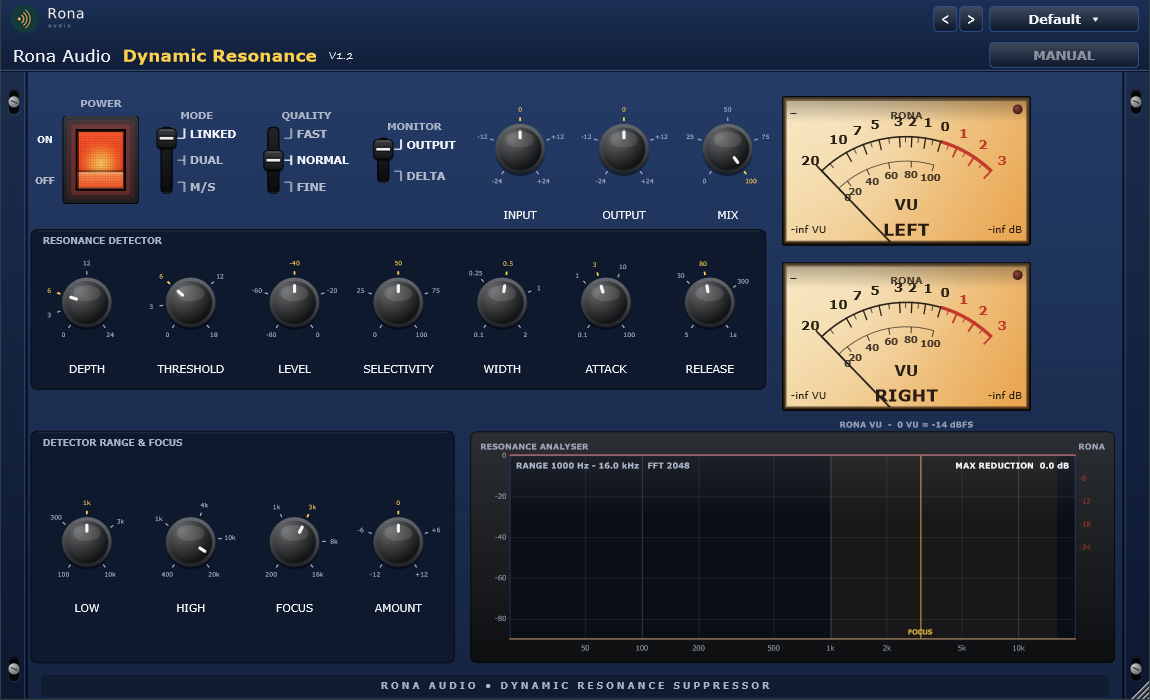
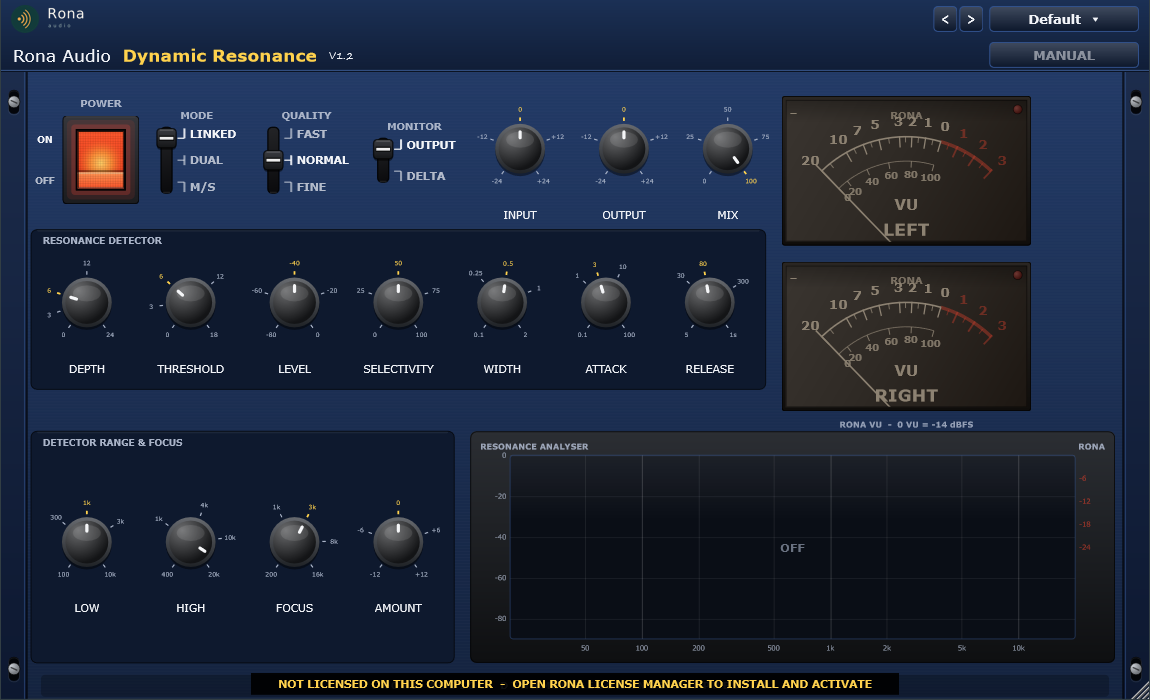
The full plugin. 1: fixed Rona Audio header. 2: POWER rocker. 3: MODE, QUALITY and MONITOR levers. 4: INPUT, OUTPUT, MIX knobs. 5: dual VU meters. 6: RESONANCE DETECTOR (DEPTH, THRESHOLD, LEVEL, SELECTIVITY, WIDTH, ATTACK, RELEASE). 7: DETECTOR RANGE & FOCUS (LOW, HIGH, FOCUS, AMOUNT). 8: RESONANCE ANALYSER. 9: rack ears.

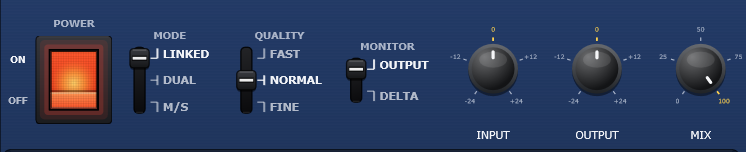
  • POWER — Click-free power; crossfades to the latency-matched input; meters and analyser dark when OFF
  • INPUT — Gain before the detector and the processing
  • OUTPUT — Gain after the MIX / DELTA stage
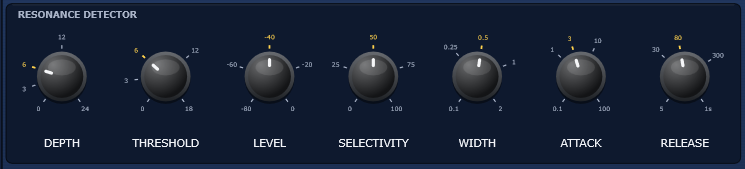
  • DEPTH — Maximum reduction applied to a resonance
  • THRESHOLD — How far a frequency must stick out above the surrounding spectrum before it is reduced
  • LEVEL — Absolute level gate: frequencies below this level are never touched (only when too loud)
  • SELECTIVITY — Concentrates the reduction on the strongest resonances (0 % = every peak above THRESHOLD gets the full DEPTH)
  • WIDTH — Width of the spectral-envelope window: narrow = only very narrow peaks count as resonances
  • ATTACK — How fast the reduction builds up per frequency
  • RELEASE — How fast the reduction lets go per frequency
  • LOW (RANGE LOW) — Lower edge of the processed range (half-octave soft edge)
  • HIGH (RANGE HIGH) — Upper edge of the processed range (kept at least 1.5 x LOW)
  • FOCUS — Centre of the focus bell (sigma half an octave)
  • AMOUNT (FOCUS AMOUNT) — Detector bias around FOCUS: + = more reduction there, – = protect
  • MODE — Stereo mode: Linked (louder channel drives one gain set) / Dual Mono / Mid-Side
  • QUALITY — FFT size: Fast 1024 / Normal 2048 / Fine 4096 – latency equals the FFT size
  • MONITOR — Output, or DELTA = only what is being removed
  • MIX — Parallel blend between the latency-matched input and the processed signal

Quick start

  1. Insert the plugin on the track (vocal, guitar, drum bus, cymbals…) in your VST3, AAX or AU host.
  2. Pick a starting point from the PRESET menu – Vocals, Guitars, Drums, Cymbals & Percussion, Bass & Keys, Mix Bus or Mastering.
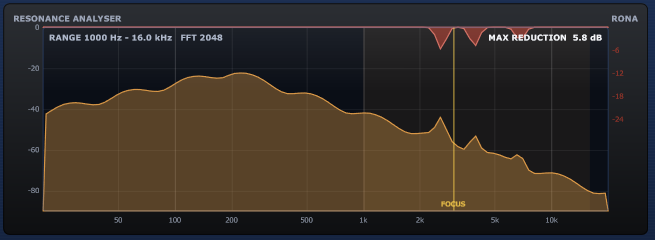
  3. Play the loudest, harshest passage. Watch the red reduction in the RESONANCE ANALYSER: it should only appear on the peaks that stick out. Raise DEPTH until the harshness is gone; raise THRESHOLD if too much is caught.
  4. Switch MONITOR to DELTA to hear only what is being removed – it should sound like the annoying part and nothing else. Switch back to OUTPUT.
  5. Use LEVEL to make sure quiet passages are never processed: only frequencies louder than LEVEL are ever reduced.

51 factory presets in 8 categories. Formats: VST3 and AAX plug-ins for Windows (64-bit) and macOS (Apple Silicon + Intel), loaded inside a compatible VST3, AAX or AU host / DAW. Mono and stereo tracks; sample rates 44.1 to 192 kHz. Latency equals the FFT size chosen with QUALITY (1024, 2048 or 4096 samples) and is reported to the host for automatic compensation. Installed, activated and updated with RONA License Manager.
System requirements

Windows Windows 10 or later (64-bit)
macOS macOS 10.13 or later — Intel & Apple Silicon (Universal 2)
CPU Windows: 64-bit Windows 10 or later; macOS: macOS 10.13 or later, Apple Silicon and Intel (Universal 2)
Formats Windows: VST3 · AAX · macOS: VST3 · AAX · AU
Installation RONA License Manager (install, activate, update)
DAWs verified Any VST3 / AU-capable DAW · Pro Tools (AAX) · Logic Pro (AU)

What’s included

Windows: VST3 / AAX · macOS: VST3 / AAX / AU · PDF manual · one license, 3 computers · installed and activated with RONA License Manager · free updates within the major version

Version

Version 1.2.1 10 September 2026

AU (Audio Unit) format added on macOS. Installation, activation and updates now handled by RONA License Manager — no activation button inside the plug-in.

Version history
1.1.0 10 September 2026
AU (Audio Unit) format added on macOS. Installation, activation and updates now handled by RONA License Manager — no activation button inside the plug-in.
1.0.0 3 September 2026
First release: spectral dynamic resonance suppressor with Linked / Dual-Mono / Mid-Side modes, DELTA monitor, resonance analyser and 51 presets.

Questions

How do I install and activate Dynamic Resonance?

Download RONA License Manager from rona.com.au/license-manager, log in with your rona.com.au account and click Install next to the product. It activates this computer, downloads the right installer for your system and installs every format. There is no serial number to enter and no activation button inside the plug-in.

How many computers can I use it on?

Each serial number can be active on up to 3 computers at the same time. On a Mac the VST3, AU and AAX formats share one activation. You can see your computers and free a slot at any time in RONA License Manager (Activations) or on rona.com.au under My Account → My Products.

Which formats are included?

Windows: VST3 and AAX. macOS: VST3, AU (Audio Unit) and AAX, Universal 2 for Intel and Apple Silicon. RONA License Manager installs all formats of a product together and they share one activation.

Do I need an internet connection?

An internet connection is needed for RONA License Manager to log in, activate, download and update your products. You do not need to be online while you work in your DAW.

Nothing happens?

the resonances are below LEVEL (lower it or raise INPUT), outside LOW..HIGH, or THRESHOLD is too high. Watch the analyser – red only appears where a peak sticks out above the envelope.

Too much is removed / it sounds dull?

lower DEPTH, raise THRESHOLD or LEVEL, narrow WIDTH, raise SELECTIVITY, or narrow the range. Check with DELTA.

Audible pumping or fluttering?

lengthen RELEASE, or use a larger QUALITY setting; for drums keep ATTACK fast and RELEASE around 80-150 ms.

Timing feels off in the DAW?

the host must compensate the reported latency (1024 / 2048 / 4096 samples). Some hosts need play to be restarted after changing QUALITY.

Related products