Rona Vintage Vari-Mu Compressor

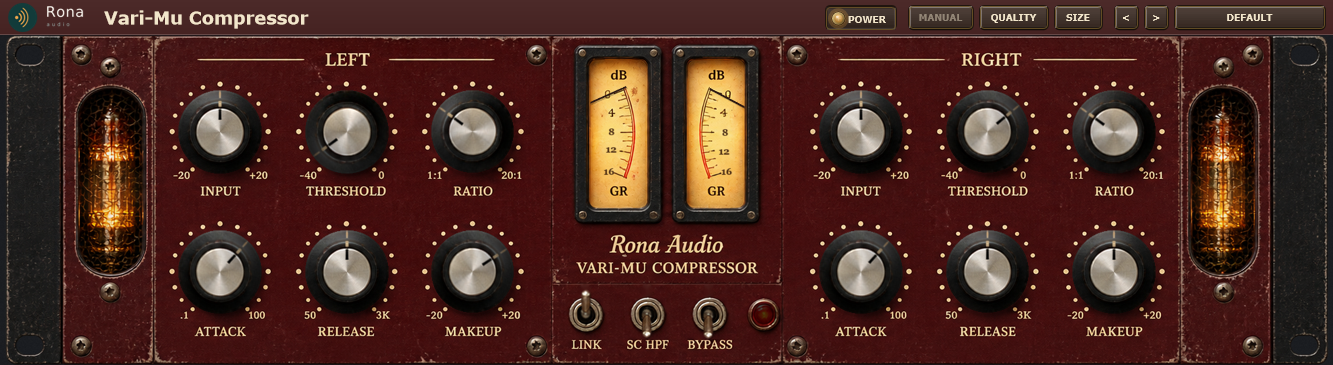
Rona Vintage Vari-Mu Compressor is a dual-channel vari-mu compressor in the Rona Vintage line from Rona Audio, with the unit’s own front panel as the interface. Every knob and switch you see works; the circuit behind them is modelled stage by stage so the controls interact the way the hardware’s do. VST3, AAX, AU for Windows and macOS — installed and activated with RONA License Manager.

US$235.00

Price in US dollars, inc. GST for Australian customers.

Hear it

Rona Vintage Vari-Mu Compressor is a dual-channel vari-mu compressor in the Rona Vintage line from Rona Audio, with the unit’s own front panel as the interface. Every knob and switch you see works; the circuit behind them is modelled stage by stage so the controls interact the way the hardware’s do.

  • INPUT L — Left channel drive into the compressor, -20 to +20 dB in 0.5 dB steps (before the detector; not shown by the GR meter)
  • THRESHOLD L — compression onset for this channel’s detector (RMS, 1 ms integration); the soft knee is 10 dB wide about it
  • RATIO L — compression strength with a soft knee: the stated ratio is reached 10 dB above the threshold (the reference level); the vari-mu law bends further above it (the ratio keeps rising with level); 1:1 = no gain reduction at a …
  • ATTACK L — detector attack time constant (the gain reduction deepens over this time, in the dB domain)
  • RELEASE L — recovery time constant (the gain reduction recovers over this time, in the dB domain)
  • MAKEUP L — Left channel trim after compression and the tube stage, -20 to +20 dB in 0.5 dB steps (not shown by the GR meter)
  • INPUT R — Right channel drive into the compressor, -20 to +20 dB in 0.5 dB steps (before the detector; not shown by the GR meter)
  • THRESHOLD R — compression onset for this channel’s detector (RMS, 1 ms integration); the soft knee is 10 dB wide about it
  • RATIO R — compression strength with a soft knee: the stated ratio is reached 10 dB above the threshold (the reference level); the vari-mu law bends further above it (the ratio keeps rising with level); 1:1 = no gain reduction at a …
  • ATTACK R — detector attack time constant (the gain reduction deepens over this time, in the dB domain)
  • RELEASE R — recovery time constant (the gain reduction recovers over this time, in the dB domain)
  • MAKEUP R — Right channel trim after compression and the tube stage, -20 to +20 dB in 0.5 dB steps (not shown by the GR meter)
  • LINK — ON: both detectors are evaluated with their own settings and the greater attenuation is applied to both channels (the image never shifts); the knob values are never overwritten. OFF: dual mono
  • SC HPF — ON: a 90 Hz 12 dB/oct high-pass in both detector paths only, so low bass drives the compressor less; the audio path keeps all its bass
  • BYPASS — ON: the latency-matched dry signal replaces the output (no trims, compression or colour) over a 20 ms crossfade; the hardware stays lit
  • REDUCED MOTION — GUI only (settings panel): the power animation uses plain fades, no needle settling bounce or glow modulation. No effect on the audio

14 factory presets in 5 categories. Formats: VST3 and AAX (Windows 10/11 64-bit); VST3, AU and AAX (macOS). Stereo output. Installed, activated and updated with RONA License Manager.
System requirements

Windows Windows 10 or later (64-bit)
macOS macOS 10.13 or later — Intel & Apple Silicon (Universal 2)
CPU Windows 10/11 64-bit; macOS
RAM 4 GB
Disk 50 MB
Formats Windows: VST3 · AAX · macOS: VST3 · AAX · AU
Installation RONA License Manager (install, activate, update)
DAWs verified Any VST3 / AU-capable DAW · Pro Tools (AAX) · Logic Pro (AU)

What’s included

Windows: VST3 / AAX · macOS: VST3 / AAX / AU · PDF manual · one license, 3 computers · installed and activated with RONA License Manager · free updates within the major version

Version

Version 1.0.0 7 October 2026

First release. 19-inch dual-channel vari-mu compressor on the Rona Vintage front panel: INPUT, THRESHOLD, RATIO, ATTACK, RELEASE and MAKEUP per channel (all stepped), LINK, SC HPF and BYPASS levers, an overload lamp, two gain-reduction meters, two glowing tubes and a POWER switch with warm-up and cool-down, MIDI Learn on every control. Windows VST3 + AAX, macOS VST3 + AU + AAX. Installed, activated and updated with RONA License Manager.
Questions

How do I install and activate Rona Vintage Vari-Mu Compressor?

Download RONA License Manager from rona.com.au/license-manager, log in with your rona.com.au account and click Install next to the product. It activates this computer, downloads the right installer for your system and installs every format. There is no serial number to enter and no activation button inside the plug-in.

How many computers can I use it on?

Each serial number can be active on up to 3 computers at the same time. On a Mac the VST3, AU and AAX formats share one activation. You can see your computers and free a slot at any time in RONA License Manager (Activations) or on rona.com.au under My Account → My Products.

Which formats are included?

Windows: VST3 and AAX. macOS: VST3, AU (Audio Unit) and AAX, Universal 2 for Intel and Apple Silicon. RONA License Manager installs all formats of a product together and they share one activation.

Do I need an internet connection?

An internet connection is needed for RONA License Manager to log in, activate, download and update your products. You do not need to be online while you work in your DAW.

Where are the controls that are not on the front panel?

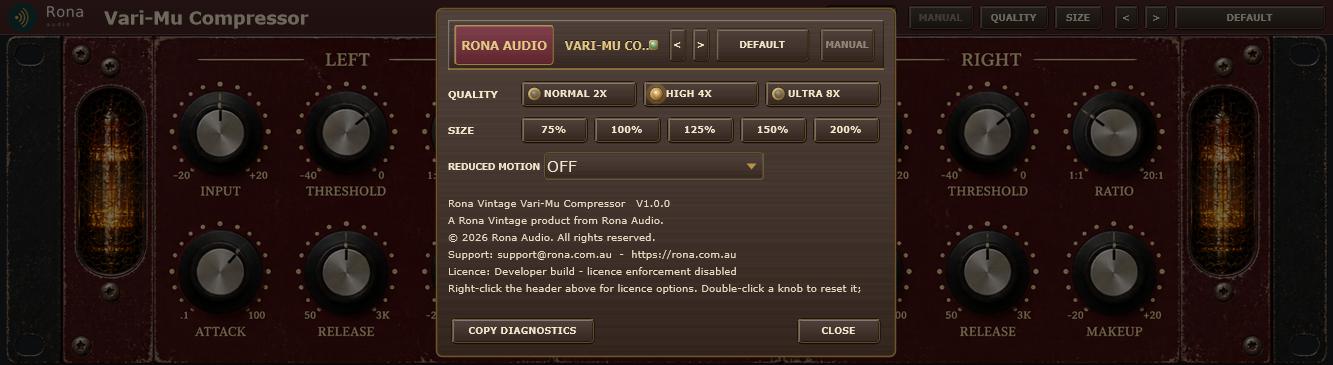
A right-click on the top bar or the panel opens the settings panel. It holds everything that is not a control on the front panel: Presets: choose a factory preset, step through presets, save, rename and delete your own. MANUAL: opens this manual. Right-click the header strip for the licence options: licence status, check now, deactivate this computer, show the machine id, load an offline licence, open RONA License Manager. QUALITY: the oversampling used by the clipping stages – Normal (2x), High (4x, default) or Ultra (8x). Higher settings reduce aliasing at the cost of CPU; the latency reported to your DAW changes with it and is compensated automatically.

Related products